

Webhooks Integration with TSplus Remote Support
Overview
Webhooks let you connect TSplus Remote Support to your own systems (ticketing, CRM, SIEM,
internal tools). When an event happens in your subscription, Remote Support sends an HTTP
POST request — containing a JSON payload describing the event — to a URL that you control.
Each request is cryptographically signed so your server can verify that it genuinely comes from Remote Support and was not tampered with.
Typical use cases:
- Automatically create or update a ticket when a support session ends.
- Archive session chat transcripts in your own storage.
- Trigger internal notifications or automation workflows.
Prerequisites
To configure webhooks, make sure you have:
- A subscription administrator account.
- A publicly reachable HTTPS endpoint able to receive
POSTrequests. - The ability to read HTTP request headers and the raw request body on your server (required to verify the signature).
Configuring a webhook
-
Open the TSplus Remote Support admin console.
-
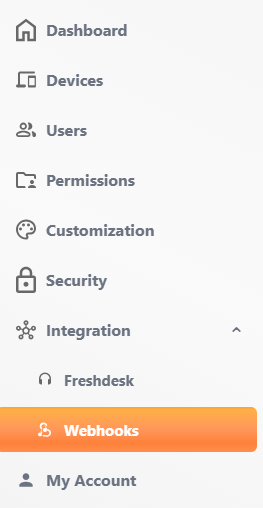
In the left menu, expand Integration and click Webhooks.
-
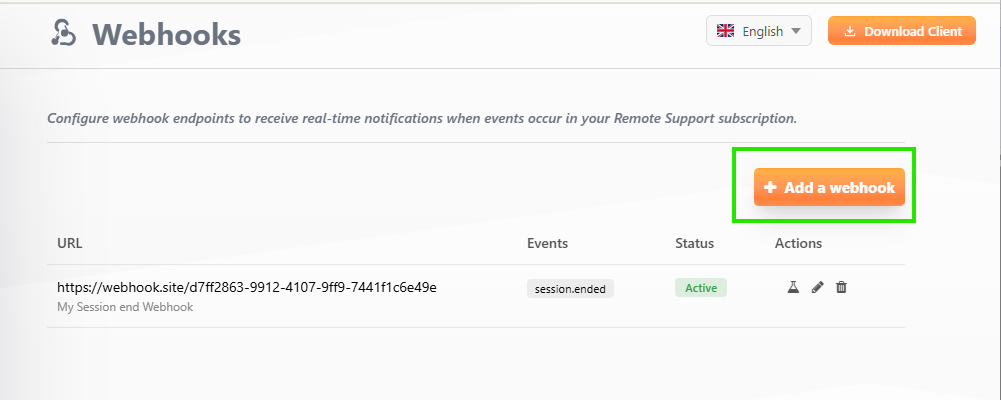
Click Add a webhook.
-
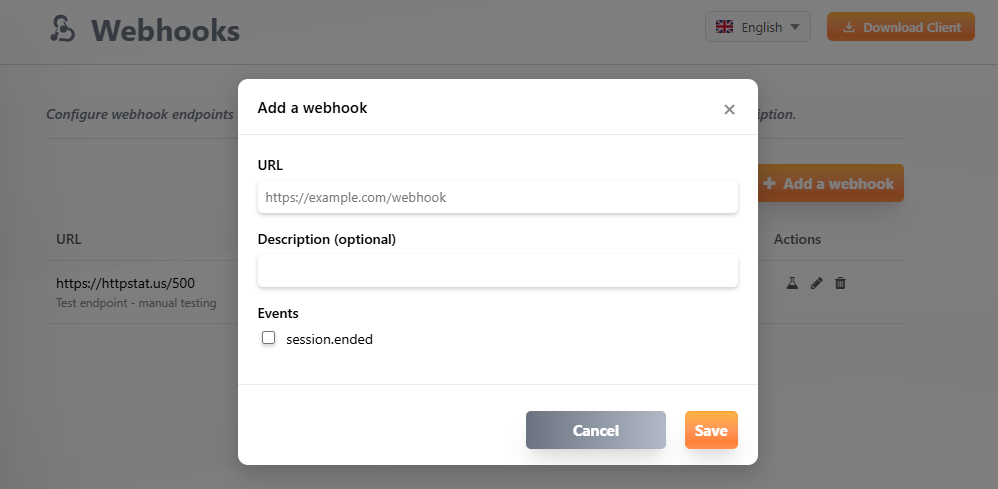
Fill in the form:
- URL — the HTTPS endpoint that will receive the events.
- Description (optional) — a label to help you identify this endpoint.
- Events — select at least one event type to subscribe to.
-
Click Save.
-
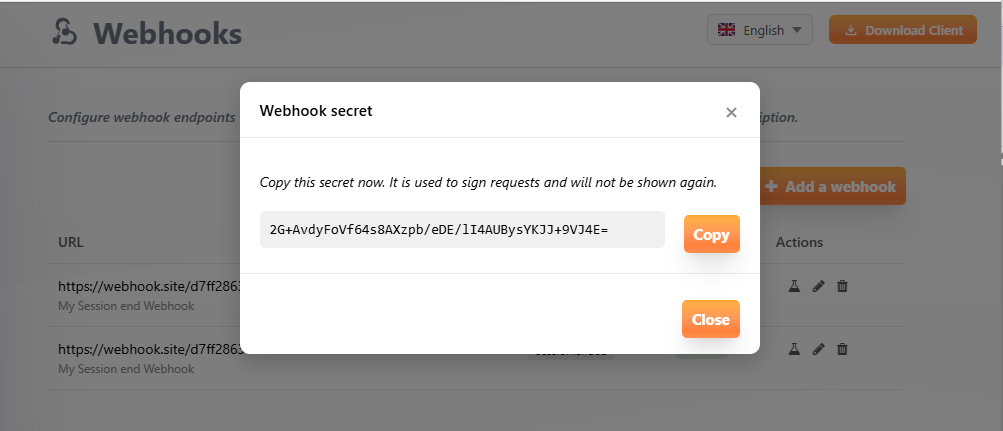
A secret is generated and displayed once. Copy it now and store it securely — it is used to verify the signature of incoming requests and will not be shown again.
Security: For your protection, the URL is validated when you save it. Endpoints pointing to
localhostor private/internal IP addresses are rejected.
Managing your webhooks
From the Webhooks list you can:
- Send a test event (flask icon) — enqueues a sample delivery so you can confirm your endpoint receives and accepts requests.
- Edit (pencil icon) — change the URL, description, subscribed events, or enable/disable the endpoint.
- Delete (trash icon) — permanently remove the endpoint.
Each endpoint shows a status:
- Active — the endpoint is enabled and receiving events.
- Disabled — the endpoint was manually disabled.
- Auto-disabled — Remote Support automatically disabled the endpoint after 10 consecutive failed deliveries. Fix the endpoint and re-enable it from the Edit form.
To inspect individual delivery attempts, filter past events, or retry a failed delivery, see Webhook Delivery Tracking.
Payload format
Every event is delivered as a POST request with a JSON body and the following headers:
| Header | Description |
|---|---|
Content-Type | application/json |
X-Webhook-Signature | HMAC-SHA256 signature of the raw body, prefixed with sha256= |
X-Webhook-Id | Unique event identifier (use it for idempotency on your side) |
X-Webhook-Timestamp | ISO 8601 timestamp of the delivery |
User-Agent | RemoteSupport-Webhook/1.0 |
All events share a common envelope. Only the content of data changes depending on the event
type:
{ "id": "evt_abc123def456", "type": "session.ended", "created_at": "2026-07-10T15:00:00Z", "subscription_key": "XXXX-XXXX-XXXX", "data": { }}session.started
Sent when a new support session is created (the first agent connects to a computer).
{ "id": "evt_abc123def456", "type": "session.started", "created_at": "2026-07-10T14:30:00Z", "subscription_key": "XXXX-XXXX-XXXX", "data": { "remote_support_id": "ABC123", "computer_name": "Front-desk PC", "started_at": "2026-07-10T14:30:00Z" }}session.ended
Sent when a support session ends (all participants disconnected). The payload includes the full chat transcript collected during the session.
{ "id": "evt_xyz789ghi012", "type": "session.ended", "created_at": "2026-07-10T15:00:00Z", "subscription_key": "XXXX-XXXX-XXXX", "data": { "remote_support_id": "ABC123", "computer_name": "Front-desk PC", "started_at": "2026-07-10T14:30:00Z", "ended_at": "2026-07-10T15:00:00Z", "duration_seconds": 1800, "is_abnormal_closure": false, "chat_transcript": [ { "timestamp": "2026-07-10T14:31:00Z", "sender": "agent", "message": "Hello, how can I help you?" }, { "timestamp": "2026-07-10T14:31:30Z", "sender": "client", "message": "My screen is black" } ] }}
is_abnormal_closureistrueonly when a session is closed by the platform after an unexpected relay restart. In that case thechat_transcriptis empty.
participant.joined
Sent when an agent joins a session.
{ "id": "evt_join789abc", "type": "participant.joined", "created_at": "2026-07-10T14:32:00Z", "subscription_key": "XXXX-XXXX-XXXX", "data": { "remote_support_id": "ABC123", "user_name": "Jane Doe", "joined_at": "2026-07-10T14:32:00Z" }}participant.left
Sent when an agent leaves a session. duration_seconds is how long that agent was connected.
{ "id": "evt_left456def", "type": "participant.left", "created_at": "2026-07-10T14:37:00Z", "subscription_key": "XXXX-XXXX-XXXX", "data": { "remote_support_id": "ABC123", "user_name": "Jane Doe", "duration_seconds": 300, "left_at": "2026-07-10T14:37:00Z" }}unattended.connected
Sent when a session is established through unattended access (an agent connecting with a
password to a computer that is already online, as opposed to a live user manually sharing their
screen). It fires exactly like session.started, but only for unattended-access sessions.
user_name identifies the agent connecting.
{ "id": "evt_unatt123on", "type": "unattended.connected", "created_at": "2026-07-10T14:30:00Z", "subscription_key": "XXXX-XXXX-XXXX", "data": { "remote_support_id": "ABC123", "computer_name": "Front-desk PC", "user_name": "Jane Doe", "connected_at": "2026-07-10T14:30:00Z" }}unattended.disconnected
Sent when an unattended-access session ends (all participants disconnected). It fires exactly
like session.ended, but only for unattended-access sessions; no single participant is
attributed since the session as a whole ends. duration_seconds is how long the session lasted.
{ "id": "evt_unatt456off", "type": "unattended.disconnected", "created_at": "2026-07-10T15:30:00Z", "subscription_key": "XXXX-XXXX-XXXX", "data": { "remote_support_id": "ABC123", "computer_name": "Front-desk PC", "duration_seconds": 3600, "disconnected_at": "2026-07-10T15:30:00Z" }}file.transferred
Sent when a file is transferred during a session. Only metadata is sent — the file content
is never stored nor transmitted. direction is "upload" (agent to remote machine) or
"download" (remote machine to agent). user_name identifies the agent, and may be empty when a
download cannot be attributed to a single agent.
{ "id": "evt_file456abc", "type": "file.transferred", "created_at": "2026-07-10T14:45:00Z", "subscription_key": "XXXX-XXXX-XXXX", "data": { "remote_support_id": "ABC123", "user_name": "Jane Doe", "file_name": "diagnostic.zip", "file_size_bytes": 2048576, "direction": "download", "timestamp": "2026-07-10T14:45:00Z" }}Verifying the signature
Your endpoint should always verify the signature before trusting a request. Anyone who knows your URL could otherwise send fake events; without the secret, they cannot produce a valid signature.
To verify a request:
- Read the raw request body (the exact bytes received — do not re-serialize the JSON).
- Compute
HMAC-SHA256(rawBody, yourSecret)and hex-encode it. - Prefix it with
sha256=and compare it to theX-Webhook-Signatureheader using a constant-time comparison.
Node.js
const crypto = require('crypto');
function verifyWebhook(rawBody, signatureHeader, secret) {  const expected = 'sha256=' + crypto    .createHmac('sha256', secret)    .update(rawBody, 'utf8')    .digest('hex');
  const a = Buffer.from(expected);  const b = Buffer.from(signatureHeader || '');  return a.length === b.length && crypto.timingSafeEqual(a, b);}
Python
import hmacimport hashlib
def verify_webhook(raw_body: bytes, signature_header: str, secret: str) -> bool:    expected = "sha256=" + hmac.new(        secret.encode("utf-8"), raw_body, hashlib.sha256    ).hexdigest()    return hmac.compare_digest(expected, signature_header or "")
Delivery and retries
- Your endpoint should respond with a 2xx status code as quickly as possible. The request times out after 10 seconds.
- If a delivery fails, Remote Support retries with an exponential backoff schedule: 10s, 30s, 1min, 5min, 15min, 1h, 4h, 24h (up to 8 attempts over 24 hours).
- Retries happen on connection errors, HTTP
429, and5xxresponses. Other4xxresponses are treated as permanent failures and are not retried. - After 10 consecutive failed deliveries, the endpoint is automatically disabled.
To avoid processing the same event twice (for example after a retry), use the X-Webhook-Id
header (or the id field in the payload) as an idempotency key.
Available events
| Event | Description |
|---|---|
session.started | A new support session was created (first agent connects). |
session.ended | A support session has ended. Includes duration and the full chat transcript. |
participant.joined | An agent joined a session. |
participant.left | An agent left a session. Includes how long they were connected. |
unattended.connected | An unattended computer came online. |
unattended.disconnected | An unattended computer went offline. Includes how long it stayed connected. |
file.transferred | A file was transferred during a session (metadata only: name, size, direction). |